Protect. Encrypt. Erase.

Your data.
Your rules.
Your control.

Automatically encrypt sensitive files after inactivity, then securely remove encrypted data when your second timer is reached.

Windows 10/11 · Free demo · Installer hosted on GitHub Releases · Release page

🔒
AES-256
Encryption
🗑
Secure
Deletion
👁
Stealth
Mode
Password
Decrypt
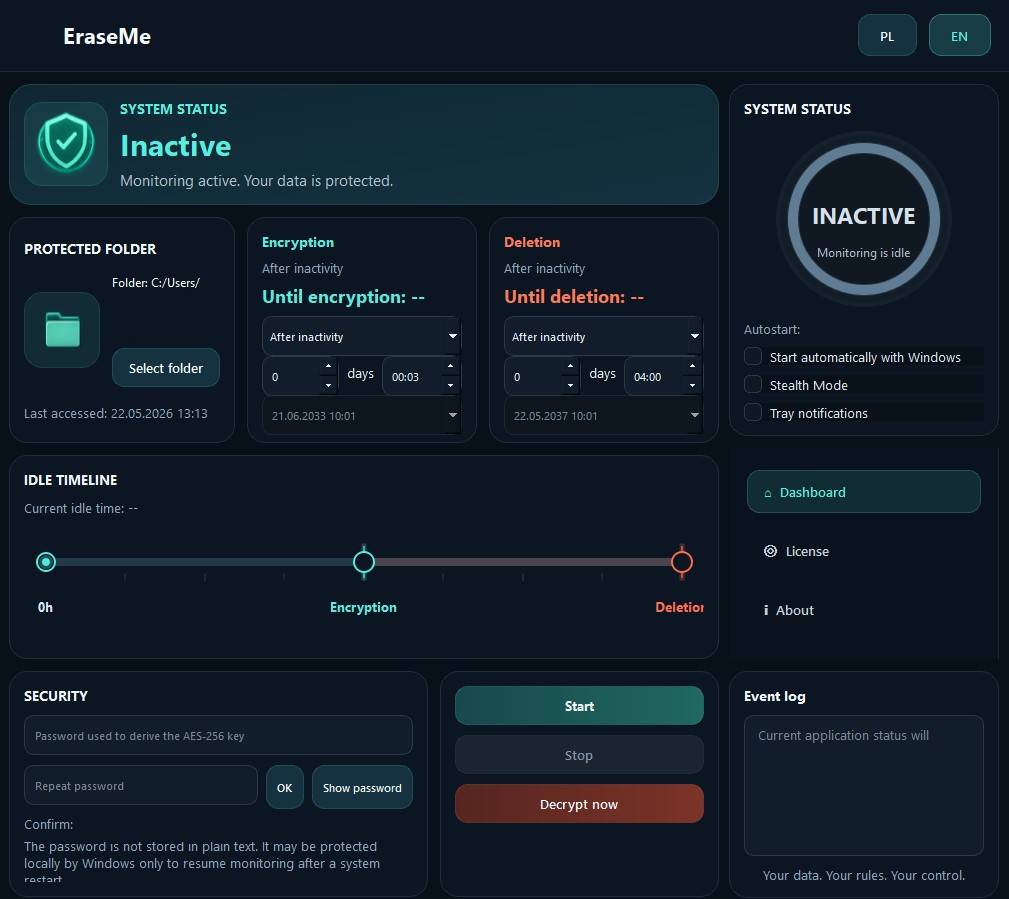
EraseMe application screen

What happens to your data
when you're not around?

Most files just sit there. Unprotected. Forgotten. Vulnerable.

EraseMe changes that.

🔒
Process

How it works

1
📁
Select folder

Choose the folder that contains your sensitive data. EraseMe will watch it silently in the background.

2
Set inactivity timers

Choose exactly when protection should activate. Use hours, days of inactivity, or a specific future date for encryption and deletion.

3
🚶
Walk away

EraseMe handles the rest. Your data is encrypted first, then the encrypted copies can be overwritten and removed when the second threshold is reached.

A chain reaction
for your data.

Idle time triggers a chain reaction: first encryption, then permanent deletion.

Encryption
Deletion
0h24h72h
🔐
Files encrypted
After 24h of inactivity
🗑
Files deleted
After 72h of inactivity
Capabilities

Powerful features

🔒
AES-256 Encryption

Industry-standard encryption helps protect your data from unauthorized access, including scenarios such as a lost or stolen device.

Smart Inactivity Detection

Monitors activity and resets timers when you return. Fully configurable per-folder.

🗑
Secure Deletion

Overwrites encrypted files before deletion to make recovery significantly harder. Effectiveness depends on the storage device and system configuration.

👁
Stealth Mode

Can hide the app window and tray icon while protection continues in the background. Restoring the interface requires your password.

Password Decrypt

Restore encrypted files with your password when you need access. Large folders may take time to process.

📋
Activity Log

Full log of events so you always know what's happening.

Audience

Who is EraseMe for?

🎒
Anyone

Secure client data, contracts and documents when you're not working, or your hardware is getting stolen.

🔐
Privacy-focused users

Keep personal files, photos and sensitive data under your control, even when you are away from your device.

🕵️
Paranoid (in a good way)

For those who believe some things should simply disappear.

⚠️
This software can permanently destroy data.

Deletion and lost passwords can make files permanently inaccessible.
Use responsibly and keep backups where needed.

Plans

Simple pricing

Free
For basic protection
$0
Always free
  • 10 protected files
  • Encryption after inactivity
  • 50 MB size limit
⬇ Download Free for Windows

Installer hosted on GitHub Releases. Open release page

💳
One-time payment

No subscriptions. Pay once, use forever.

🔒
Your data stays yours

File encryption, decryption and deletion happen locally. EraseMe does not upload your files.

🔄
Regular updates

New features and improvements included for free.

Reviews

Trusted by early users

★★★★★

Finally, a tool that respects my need for control. Simple, powerful and does exactly what it promises.

– Early user

★★★★★

EraseMe gives me peace of mind. Set it and forget it.

– Beta tester

Questions

Frequently asked questions

Can deleted files be recovered? +
EraseMe overwrites encrypted files before deleting them, which is designed to make recovery much harder. No deletion tool can honestly guarantee perfect recovery prevention on every drive, backup setup or operating system configuration.
What if I forget my password? +
There is no password recovery. By design. If you forget your encryption password, the files are inaccessible. This is a feature, not a bug. Keep your password safe.
Does EraseMe overwrite files securely? +
Yes. EraseMe performs multiple overwrite passes before deletion. On some storage devices, especially SSDs, secure deletion is best-effort because the drive and operating system may keep remapped blocks, snapshots or backups outside the app's control.
Can I test it without risk? +
Absolutely. Use the free version with test files in a separate folder, choose generous timers, and confirm you can encrypt and decrypt safely before using EraseMe on important data.